

TL;DR:
- Over half of New Zealand small businesses faced cyber threats in the past six months.
- Web security involves protecting websites, data, and systems through simple, ongoing practices.
- Regular updates, staff training, and basic protections like HTTPS and MFA are essential for safety.
More than half of NZ small businesses faced a cyber threat in the past six months. That figure has jumped sharply from 36% just a year earlier. If you think web security is only something big corporations need to worry about, this article is going to change your mind. We’ll walk you through what web security actually means, the real threats targeting Kiwi businesses right now, practical steps you can take today, and how to keep your defences strong over time. No jargon, no scary tech talk. Just clear, honest guidance you can act on.
Table of Contents
- What web security means for small NZ businesses
- The real risks: Common threats facing NZ businesses online
- Key protections: Frameworks and simple steps for everyday safety
- Advanced threats and modern challenges: What most miss
- How to keep improving: Staying ahead of web security threats
- Our take: Why real web security is more about people than tech
- Take your next step: Get expert help with web security
- Frequently asked questions
Key Takeaways
| Point | Details |
|---|---|
| Web security is essential | Protecting your website and client data is critical, even for the smallest NZ business. |
| Common threats abound | Phishing, malware, and newer attacks are increasingly common for NZ SMEs and costly. |
| Practical steps matter | Simple protections like HTTPS, MFA, updates, and staff training make a big difference. |
| Continual improvement needed | Web security is an ongoing process—use local (NCSC) resources and keep updating your defences. |
| People are the key | Fostering security awareness and culture is your most powerful protection. |
What web security means for small NZ businesses
With the urgent need for security established, let’s define what web security actually means for you.
Web security is about protecting your website, your web applications, and the data that flows through them. Think of it as locking the doors and windows of your digital shopfront. If you collect customer details, take online payments, or even just run a contact form, you have something worth protecting.
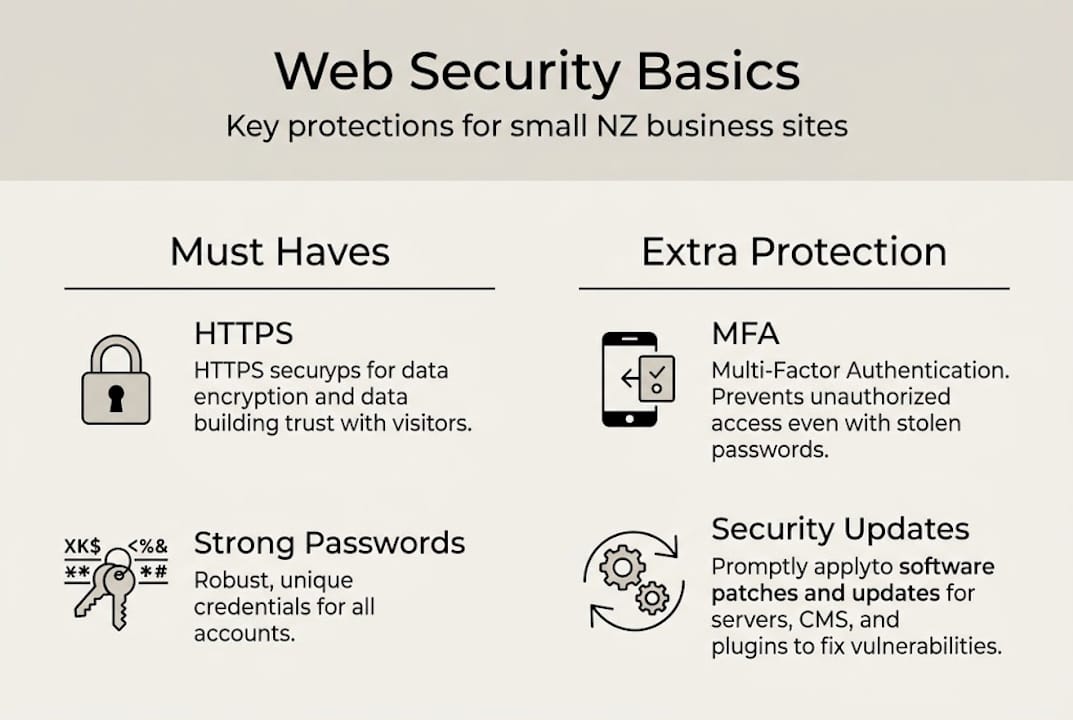
Web security protects web applications, websites, and web services using pillars like the CIA triad and AAA. These might sound technical, but they’re straightforward concepts once you break them down.
The CIA triad explained:
- Confidentiality: Only the right people see sensitive information.
- Integrity: Your data isn’t altered or corrupted without your knowledge.
- Availability: Your website and systems are up and accessible when needed.
The AAA pillars:
- Authentication: Confirming who is trying to access your system.
- Authorisation: Deciding what that person is allowed to do.
- Auditing: Keeping a record of what happened and when.
| Concept | What it means for your business |
|---|---|
| Confidentiality | Customer data stays private |
| Integrity | Orders and records aren’t tampered with |
| Availability | Your site stays online during busy periods |
| Authentication | Only staff can log into your backend |
| Authorisation | Staff see only what they need to |
| Auditing | You can trace any suspicious activity |
“Security isn’t a product you buy once. It’s a set of habits and systems that protect your business every single day.”
For NZ businesses, a breach can mean financial loss, reputational damage, and potential breaches of the Privacy Act 2020. Even a small e-commerce site holds enough data to cause real harm if compromised. Good business website security tips are your first line of defence.
The real risks: Common threats facing NZ businesses online
Understanding web security’s foundation, it’s crucial to face the biggest risks that make protection so important.
Cyber threats aren’t abstract. They’re happening to businesses just like yours, right here in New Zealand. The NCSC handled 5,995 reports in 2024/25, with phishing as the dominant threat and total losses reaching $26.9 million. That’s real money leaving real Kiwi businesses.
Common threats you should know about:
- Phishing: Fake emails tricking staff into handing over login details or payment information.
- Malware: Malicious software installed on your systems, often through a dodgy email attachment.
- Ransomware: Attackers lock your data and demand payment to release it.
- DDoS (Distributed Denial of Service): Flooding your website with fake traffic until it crashes.
- Website defacement: Hackers replace your site content with their own, damaging your brand instantly.
| Threat | Typical business impact |
|---|---|
| Phishing | Stolen credentials, financial loss |
| Malware | Data theft, system damage |
| Ransomware | Business shutdown, ransom demands |
| DDoS | Website downtime, lost revenue |
| Defacement | Brand damage, lost customer trust |
Phishing is especially dangerous for small businesses because it targets people, not just technology. A tired staff member clicking one bad link can hand attackers the keys to everything. Good web form security and clear staff protocols reduce this risk significantly.
If you suspect a breach, act fast. Change passwords immediately, contact your hosting provider, and report the incident to the NCSC. Delay makes things worse. Reviewing your essential website security features before something goes wrong is always a smarter move.
Key protections: Frameworks and simple steps for everyday safety
Knowing the risks, you need clear, practical steps to defend your business.
Secure HTTP headers, input validation, firewalls, encryption, MFA, patching, and monitoring are all vital protections. Let’s make each of these real and actionable.
Your web security checklist:
- Enable HTTPS/TLS on your entire website. If your site still shows “http://” without the “s”, fix this today.
- Turn on Multi-Factor Authentication (MFA). This means logging in requires both a password and a code from your phone.
- Validate all form inputs. This stops attackers from injecting harmful code through your contact or order forms.
- Install a Web Application Firewall (WAF). Cloudflare offers a free version that blocks a huge range of common attacks.
- Keep everything updated. WordPress plugins, themes, Shopify apps, and your hosting platform should all run the latest versions.
- Back up your site regularly. Daily automated backups mean a breach doesn’t have to be a disaster.
- Train your team. Regular, short training sessions on spotting phishing emails are worth more than most technical tools.
“The NCSC provides free guidance, alerts, and templates specifically designed for NZ businesses. Use them.”
Pro Tip: Set up Cloudflare’s free WAF on your site and enable auto-updates on your platform. These two steps alone block the majority of automated attacks that target small business websites every day.
For WordPress sites specifically, following solid WordPress security steps from the start makes ongoing protection much easier. And choosing the right web hosting with built-in security features gives you a strong foundation without extra effort.
Advanced threats and modern challenges: What most miss
Even with basics covered, it’s important not to overlook sophisticated threats that can catch businesses off-guard.
Most small business owners focus on the obvious stuff, which is great. But attackers are creative. They often chain together small vulnerabilities to create big problems. A minor issue on its own might seem harmless. Combined with another, it becomes a serious breach.
Vulnerabilities worth knowing:
- XSS (Cross-Site Scripting): Malicious code injected into your web pages, affecting your visitors.
- Open redirects: Your site is tricked into sending users to a malicious external URL.
- CSRF (Cross-Site Request Forgery): An attacker tricks a logged-in user into performing an unintended action.
- Unicode injection: Exploiting character encoding quirks to bypass security filters.
Chaining vulnerabilities such as XSS with open redirects, CSS exfiltration, and Unicode case folding exploits can pose serious but often overlooked risks, even for small websites.
| Vulnerability | Possible outcome |
|---|---|
| XSS | Customer data stolen via browser |
| Open redirect | Users sent to phishing sites |
| CSRF | Unauthorised transactions made |
| Unicode injection | Security filters bypassed |
Pro Tip: Automated security scanners are useful, but they miss context-specific issues. A manual security audit by an experienced developer catches the kinds of chained vulnerabilities that tools overlook. Even an annual review makes a real difference.
Building your site with secure website features from day one is far easier than patching problems after a breach. Prevention is always cheaper than recovery.
How to keep improving: Staying ahead of web security threats
Armed with knowledge of advanced threats, let’s see how your business can stay ahead without becoming overwhelmed.
Web security isn’t a one-off task you tick off and forget. Threats evolve. New vulnerabilities appear. Your business changes. Your security practices need to keep pace.
A simple ongoing security rhythm:
- Monthly: Apply all available software updates. Check your backup logs to confirm backups are working.
- Quarterly: Review who has access to your systems. Remove accounts for past staff or contractors immediately.
- Every six months: Run a simulated phishing test with your team to keep awareness sharp.
- Annually: Commission a full security review from a trusted developer or security specialist.
The NCSC publishes regular updates and free resources. Make it a habit to check their site every few months. Their materials are written for NZ businesses, so the guidance is directly relevant.
OWASP Top 10 mitigations, WAF deployment, MFA, HTTPS, backups, and staff training are all recommended as priority actions for small NZ businesses.
“Security is a journey, not a destination. Small, consistent actions compound into strong, lasting protection.”
Pro Tip: Schedule a recurring calendar reminder every month for updates and every six months for a team phishing drill. Making it routine removes the mental load of remembering.
Your website security feature checklist is a great starting point for building that ongoing rhythm. Use it as a living document you revisit regularly, not just once.
Also make sure you’re checking your NCSC security advice regularly. It’s free, local, and genuinely useful.
Our take: Why real web security is more about people than tech
Here’s something we’ve seen again and again working with Kiwi businesses. The firewall is set up. The software is updated. The SSL certificate is active. And then someone on the team clicks a phishing email and hands over their login credentials.
Technology creates the foundation. People are the variable.
Most breaches we hear about don’t happen because the tech failed. They happen because a staff member was busy, tired, or simply unaware of what a phishing attempt looks like. One of our clients narrowly avoided a significant incident because a vigilant team member paused before clicking a suspicious invoice link and asked their manager first. That pause saved them.
Building a culture of security awareness is just as important as any plugin or firewall. Open conversations about threats, clear reporting processes, and regular training turn your team from a potential weak link into your best defence. For businesses with online stores, understanding e-commerce security at a human level is especially critical. Tech is the tool. Your people are the strategy.
Take your next step: Get expert help with web security
Ready to make your business safer online? Here’s how to get tailored, expert support.
You don’t have to figure this out alone. Web security can feel overwhelming, but the right partner makes it manageable and actually quite straightforward.

At Virtual Innovation, we work with small NZ businesses every day to build secure, high-performing websites on WordPress and Shopify. We set things up properly from the start so you’re not scrambling to fix problems later. Our Auckland web design team understands the local landscape and the real risks facing Kiwi businesses. Whether you need a secure new build or want to tighten up your existing site, we’ve got you covered. Our Shopify agency support is here for e-commerce businesses that need rock-solid security built in. Don’t wait for an incident to act. Get in touch today.
Frequently asked questions
What are the most important web security steps for my small business?
Key protections include using HTTPS, enabling MFA, keeping software updated, using strong passwords, and training your staff to recognise phishing attempts. Start with these five and you’ll be ahead of most small businesses.
How common are cyber attacks on NZ small businesses?
Over 53% of NZ SMEs were targeted in the past six months alone, with total losses of $26.9 million recorded in 2024/25. Cyber attacks on small businesses are far more common than most people realise.
What tools or resources are available for web security in New Zealand?
The NCSC provides free resources, alerts, and guidance tailored specifically for NZ businesses, including practical templates and reporting channels for incidents.
Are advanced threats like XSS and Unicode exploits relevant to small businesses?
Yes. Advanced exploits like XSS and Unicode chaining can affect any website, regardless of size. Patching promptly and running regular audits is your best defence.
How often should I review or update web security measures?
Security reviews should happen at least annually, with software updates applied monthly or immediately when a vulnerability is discovered. Consistency is what keeps you protected.