

TL;DR:
- Data-driven analytics identify user friction points to improve website performance and conversions.
- Implementing basic free tools like GA4 can significantly boost NZ service business results.
- Regular analysis and testing lead to continuous website improvements without sacrificing creativity.
Your website might look brilliant. Clean layout, great photos, professional copy. But if visitors aren’t booking, calling, or enquiring, something is broken. Many NZ service business owners assume a polished design equals results. It doesn’t always. What actually separates high-performing websites from pretty ones is data. Analytics tells you what real users do when they land on your site, where they get stuck, and why they leave. This guide walks you through how to use analytics to make smarter design decisions, fix hidden problems, and turn more visitors into paying clients.
Table of Contents
- Why analytics matter for modern web design
- Proven impact: Real-world results from analytics-driven redesigns
- Getting started: Analytics tools and essential metrics for NZ service websites
- Solving design blind spots: Analytics for edge cases and continuous improvement
- Balancing creativity with data: Myths, realities and best practices
- What most advice misses about analytics in web design
- Elevate your web results with analytics-driven design
- Frequently asked questions
Key Takeaways
| Point | Details |
|---|---|
| Analytics reveals user barriers | Data shows exactly where visitors struggle, so you can fix what matters most. |
| Small tweaks deliver big gains | Minor analytics-led improvements can double conversions or drive more bookings. |
| Design is more than looks | A beautiful site without analytics risks costly blind spots and lost sales. |
| Edge cases matter | Addressing errors and mobile issues ensures all users get a seamless experience. |
| Creativity thrives with data | Analytics supports, not restricts, your creative vision by showing what actually works. |
Why analytics matter for modern web design
Most websites are built on assumptions. The business owner likes a certain layout. The designer prefers a particular colour palette. The copywriter has a favourite call-to-action style. None of that is necessarily wrong, but none of it is based on what your actual visitors do.
That’s where analytics changes everything. Data-driven web design tracks user behaviour metrics like bounce rates, session duration, page views, and conversion funnels to identify friction points and optimise layouts, calls-to-action, and navigation. In plain terms, it shows you where people are getting confused, bored, or frustrated.
Here are the core metrics worth understanding:
- Bounce rate: The percentage of visitors who leave after viewing only one page. A high bounce rate often signals a mismatch between what users expected and what they found.
- Session duration: How long someone spends on your site. Short sessions on key service pages can mean the content isn’t answering their questions.
- Conversion funnels: The path a user takes from landing on your site to completing a goal, like submitting a form or making a booking.
- Exit pages: The last page someone views before leaving. These pages are often where the real problems hide.
Without this data, you’re guessing. And guessing costs money. You might spend thousands on a redesign that fixes the wrong things entirely.
“The goal of analytics isn’t to replace your instincts. It’s to test them. When data confirms your instincts, you move with confidence. When it contradicts them, you’ve just saved yourself a costly mistake.”
For NZ service businesses, the stakes are real. If your website generates enquiries, losing even a handful of potential clients each month because of a confusing form or a slow-loading page adds up fast. Pairing business coaching with GA4 helps you connect website behaviour to actual business outcomes, not just vanity metrics.
The core benefit of analytics-led design is straightforward: you stop spending on what looks good and start investing in what works.
Proven impact: Real-world results from analytics-driven redesigns
Let’s talk numbers. Because the results from analytics-informed web design aren’t marginal. They’re significant.
T-Mobile’s case study is one of the most cited examples. A 42% improvement in their Largest Contentful Paint (LCP) load metric led to a 60% increase in their visit-to-order rate and 20% fewer customer complaints. That’s not a redesign from scratch. That’s targeted, data-led optimisation.
CaliberMind achieved a 136% boost in conversions after a focused analytics-driven redesign. Physitrack, a NZ health-tech company, saw a 120% increase in signups by optimising their user flows based on analytics data.

| Business | Change made | Result |
|---|---|---|
| T-Mobile | 42% LCP load improvement | 60% more visit-to-order conversions |
| CaliberMind | Analytics-led site redesign | 136% conversion increase |
| Physitrack (NZ) | Optimised signup flows | 120% more signups |
Statistic to remember: A 120%+ conversion gain is achievable for NZ service businesses through focused, analytics-led improvements. You don’t need a massive budget. You need the right data.
For locally built high-performance NZ websites, these kinds of results are absolutely within reach. The pattern across every case study is the same: identify the friction, fix it, measure the outcome.
Pro Tip: The fastest wins usually come from tracking where prospects drop off in your forms or booking funnels. If 80% of users start your contact form but only 30% finish it, that’s your priority. Fix that one thing before touching anything else.
You can see this approach in action through our website case studies, where targeted improvements to service websites delivered measurable growth. The custom web development benefits for NZ small businesses become very clear when you see what focused data can do.
Getting started: Analytics tools and essential metrics for NZ service websites
You don’t need to be a data scientist to get value from analytics. The tools available today are genuinely accessible, and many are free.
Here’s how to get started:
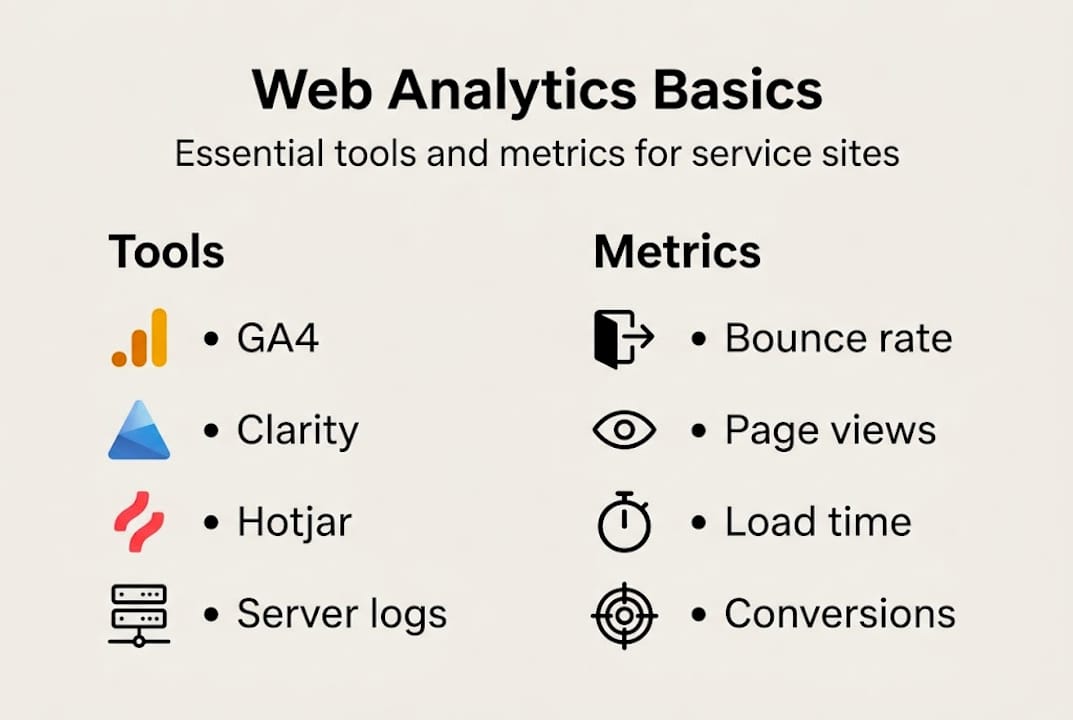
- Install Google Analytics 4 (GA4). This is your foundation. GA4 tracks user journeys, events, and conversions across your site. It’s free and integrates with most WordPress and Shopify setups.
- Add Microsoft Clarity or Hotjar. These tools record actual user sessions and generate heatmaps showing where people click and scroll. Seeing a real user struggle with your navigation is far more motivating than a spreadsheet.
- Identify your top three goals. For a service business, these are usually: form submissions, phone clicks, and page visits to your key service pages.
- Audit your high-bounce pages. Pull up your top landing pages and check the bounce rate. Anything above 70% on a service page deserves immediate attention.
- Set micro-goals. Rather than aiming to “get more leads,” target something specific: increase form completion by 20% in 90 days. Measurable goals create accountability.
According to the web analytics glossary, implementing GA4 alongside Clarity or Hotjar for baseline measurement, auditing high-bounce pages, A/B testing calls-to-action and forms, and targeting three-second load times can boost conversions by 50 to 200%.
For NZ service websites, also consider your hosting location. A server based in Australia or New Zealand will load faster for local visitors than one hosted in the US. Page speed is a ranking factor and a conversion factor. Three seconds is the threshold. Beyond that, you start losing people.
Pro Tip: Start with using GA4 for business insight before adding more complex tools. One platform used well beats five platforms used poorly.
Solving design blind spots: Analytics for edge cases and continuous improvement
Here’s something most web design guides skip over. Your website probably works fine for the average visitor on a desktop with fast broadband. But what about everyone else?
Edge cases are situations outside the typical user journey. Think mobile users on a slow connection, someone whose form submission fails mid-way, or a visitor using an older browser. Edge case web design strategies show that “happy path” designs fail when edge cases become main journeys. Errors, interruptions, and mobile issues often affect far more users than designers realise.
| Happy path design | Edge-case resilient design |
|---|---|
| Assumes fast internet | Optimised for slow networks |
| Desktop-first layout | Mobile-first, tested on real devices |
| No error recovery | Save/resume forms, clear error messages |
| Ignores accessibility | Meets WCAG accessibility standards |
Analytics helps you spot these blind spots. Session recordings catch users rage-clicking on broken elements. Error reports flag pages that return 404s. Mobile traffic data shows if your mobile experience is underperforming relative to desktop.
Here are quick wins for addressing common edge-case issues:
- Add a save-and-resume option to long enquiry forms
- Set up automated alerts for pages with sudden traffic drops
- Test your site on actual mobile devices, not just browser emulators
- Review your 404 error pages and redirect broken links
- Check your site speed on a throttled mobile connection
Sampling in analytics can also miss rare but high-impact issues. If only 2% of your visitors experience a broken checkout, that might not show up clearly in aggregate data. Reviewing actual user session recordings is the only reliable way to catch these. The custom web design advantages for NZ service businesses include having a site built to handle these scenarios from the start, rather than patching them later.
Balancing creativity with data: Myths, realities and best practices
There’s a fear that analytics turns websites into sterile, conversion-obsessed machines. That creativity gets sacrificed at the altar of data. This is a myth worth busting.
“A beautiful website that doesn’t convert is just an expensive brochure. Data doesn’t kill creativity. It gives creativity a purpose.”
The functional vs beautiful sites debate is well-documented. Data informs better creative decisions without dictating pixels. Functional sites consistently outperform visually impressive but confusing ones. That doesn’t mean your site should look boring. It means every design choice should have a reason.
Here’s how to blend creativity with conversion insight:
- Use analytics to identify which pages need the most work, then apply creative solutions to fix them
- A/B test visual elements like button colours, headline styles, and image choices to find what resonates
- Let your brand personality shine in the copy and imagery while keeping navigation and structure user-tested
- Treat your website as a living thing, not a finished product. Iterate regularly.
- Involve real customers in feedback sessions alongside analytics reviews
For NZ service owners, this balance is especially important. Your website needs to feel like you. Warm, trustworthy, local. Analytics helps you keep that personality while making sure the site actually works. Explore web design best practices that bring both creativity and conversion together.
What most advice misses about analytics in web design
Most articles about analytics in web design are written for enterprise teams with dedicated data analysts. That’s not you. And that’s actually good news.
Small NZ service businesses have an advantage that big companies don’t. You’re close to your customers. You know their questions, their hesitations, and what finally convinces them to book. Analytics gives you the data layer on top of that human understanding. Together, they’re a genuinely unfair advantage.
You don’t need to track everything. Start with your top-exit page or your main service booking funnel. Fix one thing. Measure the result. Then move to the next. Constant improvement beats waiting for perfection every single time.
Pro Tip: Pair monthly analytics reviews with a short customer feedback survey. Ask three questions: What almost stopped you from booking? What made you trust us? What could be clearer? The answers will surface insights your web results that matter data alone will never show.
This is the approach that actually moves the needle for small service businesses in New Zealand. Not big budgets. Not complex tools. Just consistent attention to what your data and your customers are telling you.
Elevate your web results with analytics-driven design
If this article has sparked some questions about your own website, that’s a great sign. It means there’s opportunity sitting right there, waiting to be found.

At Virtual Innovation, we work with NZ service businesses to build websites that don’t just look great but actually perform. Whether you need a WordPress website design for NZ service owners or a conversion-focused Shopify web agency solution, we bring analytics thinking into every project from day one. We can also run a site audit to show you exactly where your current site is losing potential clients. Get in touch for a no-pressure strategy session. We’d love to help you get more from what you already have.
Frequently asked questions
What analytics metrics matter most for small NZ service websites?
Start with bounce rate, page views, session duration, load times, and conversion rates. These user behaviour metrics reveal where users struggle and point directly to where improvements will have the most impact.
Is analytics-driven design expensive or complicated to set up?
Not at all. Tools like GA4 and Microsoft Clarity are free, and a basic analytics setup covering high-bounce page audits, A/B testing, and load time targets can be in place within a few hours.
Does using analytics mean losing creative control of my website?
Not at all. Data informs creative decisions without dictating the look and feel, so your brand personality stays intact while your site becomes more effective.
How often should I review analytics for web improvements?
Monthly reviews are ideal for spotting patterns and making timely changes, but even a quarterly check-in is far better than ignoring the data entirely.
Can analytics really boost my bookings or sales if my site already looks good?
Absolutely. Even stylish sites can gain 60 to 120% more conversions through targeted analytics-driven tweaks, as demonstrated by T-Mobile’s load time improvements and Physitrack’s optimised signup flows.