

WordPress powers over 43% of all websites globally, yet many New Zealand small business owners hesitate, wondering if it’s the right platform for their needs. The truth is, this dominant market position exists for good reason. WordPress combines flexibility, community support, and proven reliability in ways that benefit service companies looking to enhance their online presence. This article explores why WordPress remains a smart choice in 2026, covering its strengths, maintenance realities, optimisation strategies, and how it compares to other platforms for Kiwi businesses.
Table of Contents
- Understanding WordPress’s Dominance And Appeal
- Weighing WordPress’s Maintenance And Security Considerations
- Optimising WordPress For Speed, Security And User Experience
- Comparing WordPress With Other Website Platforms For Nz Businesses
- How Virtual Innovation Can Support Your WordPress Journey
Key takeaways
| Point | Details |
|---|---|
| Market dominance | WordPress runs 43% of global websites and 61% of CMS platforms, proving reliability |
| Community strength | Vast plugin ecosystem and developer support solve business challenges quickly |
| Maintenance needs | Regular updates and security practices are essential but manageable |
| Optimisation matters | Speed and performance require attention to caching, images, and lean plugins |
| Strategic choice | WordPress offers customisation advantages over competitors when properly managed |
Understanding WordPress’s dominance and appeal
The numbers tell a compelling story. WordPress powers 43% of all websites globally and commands 61% of the CMS market, making it the undisputed leader in website platforms. For New Zealand small business owners, this dominance translates directly into practical advantages you can leverage today.
This massive user base creates an ecosystem unlike any competitor. Thousands of developers worldwide contribute plugins, themes, and solutions specifically designed for business needs. When you encounter a challenge, whether it’s booking systems, payment gateways, or customer relationship management, chances are excellent someone has already built a WordPress solution.
The benefits of using WordPress extend across multiple business sectors. Professional services firms use it for client portals and case studies. Retailers integrate e-commerce functionality seamlessly. Hospitality businesses showcase properties with stunning galleries and booking systems. This versatility means your website can grow alongside your business without platform limitations.
Consider what this support network means practically:
- Immediate access to troubleshooting guides and forums when issues arise
- Thousands of pre-built solutions reducing custom development costs
- Regular security updates backed by a global community monitoring threats
- Continuous platform improvements without vendor lock-in
Pro Tip: The WordPress community’s size means you’re never alone when technical challenges arise, making it ideal for small businesses without dedicated IT staff.
WordPress’s market leadership isn’t accidental. It reflects decades of refinement, community input, and real-world business use that has shaped it into a platform genuinely suited for commercial needs.
This foundation makes WordPress website design a strategic choice rather than simply following trends. You’re building on proven infrastructure that major corporations and small businesses alike trust for their online presence.
Weighing WordPress’s maintenance and security considerations
Every platform demands ongoing attention, and WordPress is no exception. Understanding these requirements upfront helps you plan realistically and avoid surprises that derail your online strategy.
The average WordPress site runs 34 plugins requiring regular updates, each representing a potential security vulnerability if neglected. This isn’t meant to frighten you, but rather to emphasise that WordPress websites need active management. Outdated plugins create entry points for hackers, making WordPress sites attractive targets precisely because of the platform’s popularity.
Performance metrics reveal another consideration. WordPress sites average a 612ms time to first byte, which impacts user experience and search engine rankings. While this baseline is acceptable, unoptimised sites often perform far worse, leading to frustrated visitors and lost business opportunities.
The financial reality deserves honest discussion. Annual maintenance costs typically range from NZD 5,000 to 15,000 for professional management covering:
- Regular plugin and theme updates ensuring compatibility
- Security monitoring and immediate vulnerability patches
- Database optimisation preventing performance degradation
- Backup systems protecting against data loss
- Occasional troubleshooting when conflicts arise
These figures might seem substantial, but they reflect the true cost of maintaining a professional online presence. Cutting corners on WordPress maintenance considerations often leads to far more expensive emergency repairs or complete rebuilds after security breaches.
Unoptimised WordPress installations accumulate digital bloat over time. Unused plugins, uncompressed images, and poorly coded themes slow your site progressively. This degradation happens gradually, making it easy to miss until customers complain about loading times or search rankings drop noticeably.

Pro Tip: Schedule quarterly reviews of your plugin list, removing anything unused, and partner with developers who proactively monitor your site rather than waiting for problems to emerge.
The WordPress SEO migration process becomes particularly important when upgrading or moving hosting providers. Poor execution can devastate search rankings built over years, making professional guidance worthwhile during major changes.
Security isn’t just about updates. Strong password policies, two-factor authentication, and limiting login attempts form your first defence line. Regular backups stored off-site ensure you can recover quickly if breaches occur despite precautions.
Optimising WordPress for speed, security and user experience
Raw WordPress installations rarely deliver optimal performance straight out of the box. Strategic optimisation transforms adequate websites into exceptional digital assets that serve your business goals effectively.
Speed improvements start with caching mechanisms that reduce server load dramatically. When properly configured, caching stores pre-generated page versions, serving them instantly rather than rebuilding pages for every visitor. This single change often cuts loading times by 50% or more.
Image optimisation represents low-hanging fruit many businesses overlook. Photographs straight from cameras contain far more data than web display requires. Compression tools reduce file sizes by 70-80% without visible quality loss, dramatically improving page load speeds without sacrificing visual appeal.
Follow this sequential optimisation process for measurable improvements:
- Audit current plugin usage, removing anything inactive or redundant
- Implement caching through reputable plugins or hosting features
- Compress and properly size all images across your site
- Minify CSS and JavaScript files to reduce code bloat
- Enable lazy loading so images load only when visitors scroll to them
- Choose a lightweight theme prioritising performance over excessive features
- Configure a content delivery network for faster global access
- Monitor ongoing performance with tools tracking load times and user experience
This table compares common optimisation techniques by impact and implementation effort:
| Technique | Performance Benefit | Implementation Effort | Ongoing Maintenance |
|---|---|---|---|
| Caching plugins | High (40-60% faster) | Low (plugin install) | Minimal (occasional updates) |
| Image compression | High (30-50% faster) | Medium (bulk optimisation) | Low (compress new uploads) |
| Plugin reduction | Medium (10-25% faster) | Medium (testing alternatives) | Low (periodic audits) |
| Code minification | Low (5-15% faster) | Low (plugin automation) | Minimal (automatic) |
| CDN implementation | Medium (20-40% faster) | Medium (service setup) | Low (mostly automatic) |
Security optimisation extends beyond updates. Implementing Web Application Firewalls blocks malicious traffic before it reaches your site. Regular security scans identify vulnerabilities proactively rather than discovering them through breaches.
User experience optimisation focuses on mobile responsiveness and intuitive navigation. Over 60% of web traffic comes from mobile devices in 2026, making mobile-first design essential rather than optional. Your site must function flawlessly on smartphones and tablets, not just desktop computers.
WordPress loading optimisation tips specific to blog posts and content pages help maintain speed as your site grows. Strategic database cleaning removes accumulated revisions and spam comments that bloat your installation over time.
Pro Tip: Partner with local WordPress developers who understand New Zealand business contexts and can provide ongoing monitoring, catching performance issues before they impact your customers.
Following WordPress website design best practices from the start prevents many optimisation headaches later. Building with performance in mind costs less than retrofitting poorly constructed sites.
Comparing WordPress with other website platforms for NZ businesses
Choosing the right platform requires understanding how WordPress stacks against alternatives popular among New Zealand small businesses. Each option brings distinct advantages and limitations affecting your long-term success.
This comparison table highlights key differences:
| Platform | Customisation | Ongoing Cost | Ease of Use | Maintenance Required | Best For |
|---|---|---|---|---|---|
| WordPress | Excellent | Medium-High | Moderate | High | Businesses wanting full control and scalability |
| Shopify | Good (e-commerce) | Medium | Easy | Low | Online retailers prioritising simplicity |
| Wix | Limited | Low-Medium | Very Easy | Very Low | Basic sites with minimal technical needs |
| Squarespace | Moderate | Medium | Easy | Low | Design-focused businesses with standard needs |
WordPress commands 61% of the CMS market for compelling reasons beyond simple popularity. The platform’s open-source nature means no vendor controls your destiny. You own your content completely and can migrate hosting providers freely, avoiding lock-in that constrains business decisions.
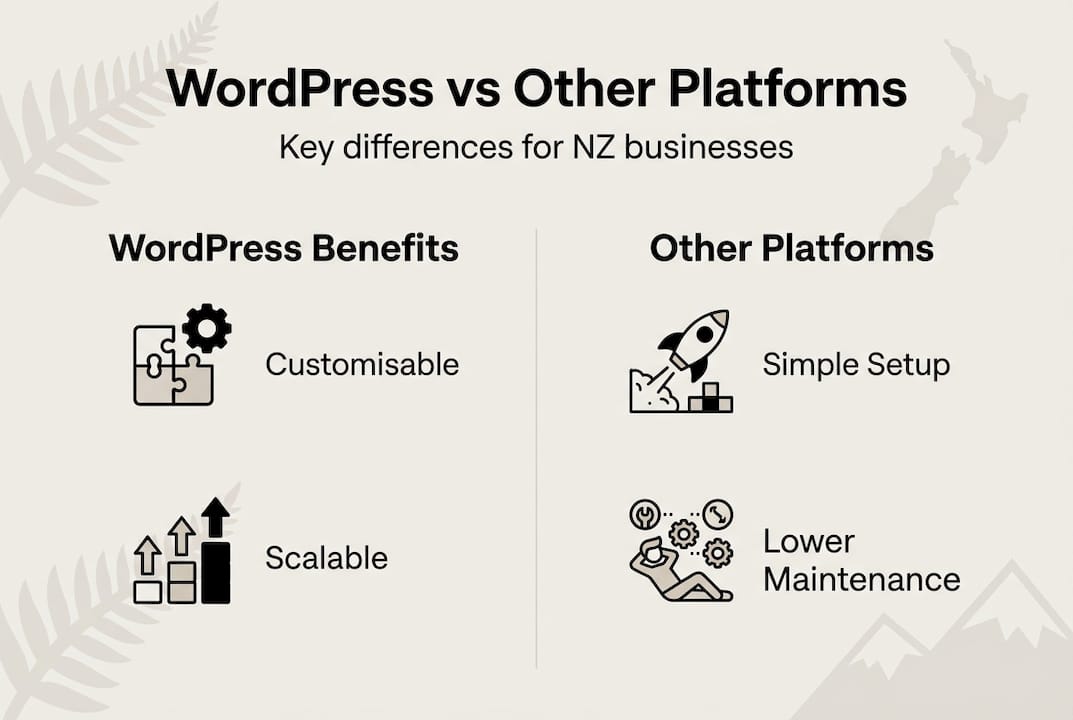
Shopify excels for pure e-commerce operations, offering streamlined store management with minimal technical knowledge. However, this convenience comes with less flexibility for custom functionality. When your business needs extend beyond standard online retail, Shopify’s limitations become apparent compared to WordPress’s extensibility.
Key decision factors for New Zealand businesses include:
- Budget constraints and tolerance for ongoing maintenance costs
- Technical capacity within your team or access to developer support
- Growth trajectory and anticipated feature needs over 3-5 years
- Industry-specific requirements like booking systems or client portals
- Content marketing importance and blogging frequency
- E-commerce complexity and inventory management needs
WordPress shines when businesses require tailored solutions matching unique processes. Service companies often need custom client portals, project management integrations, or specialised booking systems. WordPress accommodates these requirements through custom development or existing plugins, whereas hosted platforms like Wix impose rigid structures.
The maintenance and security management differences between WordPress and turnkey solutions like Shopify represent the core trade-off. WordPress demands more active management but rewards that investment with unlimited customisation potential. Shopify handles technical details automatically but restricts what you can modify.
Expert WordPress developers in New Zealand bridge the complexity gap, making WordPress accessible to non-technical business owners. This professional support transforms WordPress from a DIY challenge into a managed solution combining flexibility with reliability.
Shopify website solutions suit businesses where e-commerce represents the primary function and customisation needs remain modest. WordPress better serves companies where the website supports diverse business processes beyond simple product sales.
Staying current with WordPress design trends ensures your site remains competitive visually and functionally. The platform’s evolution continues addressing modern business needs, from progressive web app capabilities to advanced personalisation features.
Working with an expert WordPress developer familiar with New Zealand business contexts provides advantages beyond technical skills. Local developers understand regional payment preferences, shipping logistics, and customer expectations specific to Kiwi markets.
How Virtual Innovation can support your WordPress journey
Navigating WordPress’s possibilities becomes straightforward with the right partner. Virtual Innovation specialises in transforming website ideas into efficient, user-friendly WordPress sites that genuinely serve New Zealand small business needs.
Our Auckland-based team understands the challenges service companies face online. We’re not here to blind you with jargon or push unnecessary features. Instead, we focus on building WordPress website design solutions that make your business more efficient and attract more customers.
Whether you’re launching your first business website or upgrading an outdated platform, our expert WordPress developer team provides down-to-earth guidance throughout the process. We handle the technical complexities while keeping you informed and in control of decisions affecting your business.
Our WordPress SEO migration expertise ensures your hard-earned search rankings transfer safely when upgrading or switching platforms. We incorporate current design trends and security best practices as standard, not expensive add-ons. Get in touch to discuss how WordPress can strengthen your online presence in 2026.
FAQ
Is WordPress suitable for small businesses in New Zealand?
Yes, WordPress’s flexibility and extensive support community make it ideal for businesses of all sizes across New Zealand. The platform accommodates diverse industries from professional services to hospitality, with customisation options matching your specific business processes. Its scalability means your website grows alongside your business without requiring platform changes.
How much does maintaining a WordPress website cost annually?
Annual maintenance costs typically range between NZD 5,000 and 15,000 depending on site complexity and required support level. These costs cover essential services including plugin updates, security monitoring, regular backups, and occasional developer assistance. Investing in proper maintenance prevents far more expensive emergency repairs or security breach recovery.
Can WordPress websites be optimised for fast performance?
Optimisation techniques such as caching, image compression, and strategic plugin management significantly improve WordPress speed. Professional implementation of these strategies often reduces loading times by 50% or more. WordPress sites achieve competitive performance when properly configured and maintained, directly impacting user experience and search rankings.
How does WordPress compare to Shopify for NZ small businesses?
WordPress offers substantially more customisation flexibility but requires active maintenance, while Shopify simplifies e-commerce setup with less flexibility for unique features. Your choice depends on whether your business prioritises complete control and scalability (WordPress) or streamlined store management with standard functionality (Shopify). Consider your technical resources, budget, and long-term feature requirements when deciding. Explore Shopify website solutions if your primary focus is straightforward online retail.
What security measures does WordPress require?
WordPress security demands regular plugin and theme updates, strong password policies, and two-factor authentication implementation. Additional protection comes from Web Application Firewalls, automated backups stored off-site, and limiting login attempts to prevent brute force attacks. The platform’s popularity makes it a target, but these proactive measures effectively protect your business website when consistently applied.