

TL;DR:
- Effective typography enhances readability, builds trust, and improves user engagement on websites.
- Keep font choices minimal, prioritize clarity, and optimize font loading for better performance.
- Small design details in typography significantly impact brand perception and conversion rates.
Most small business owners think typography is just about picking a nice font. It’s not. Typography covers every decision about how text looks and feels on your site, from spacing and sizing to hierarchy and colour contrast. Get it right, and visitors stay longer, trust you faster, and convert more often. Get it wrong, and people leave before they’ve read a single sentence. If you’re running a business in New Zealand and want your website to actually work for you, understanding typography is one of the smartest moves you can make.
Table of Contents
- What is typography and why does it matter for websites?
- Core principles of effective web typography
- Comparing font choices: What actually matters for screens?
- Optimising web typography for branding and performance
- Why most small businesses underestimate typography’s ROI
- Transform your website with expert NZ design
- Frequently asked questions
Key Takeaways
| Point | Details |
|---|---|
| First impressions count | Well-chosen typography boosts trust and keeps users engaged from the first visit. |
| Keep it simple | Limit your website to 1-3 typefaces and focus on readability for best results. |
| Performance matters | Optimised, self-hosted fonts speed up your site and help with brand consistency. |
| Quality beats style | A readable, well-spaced font often outperforms a trendy but hard-to-read typeface. |
What is typography and why does it matter for websites?
Typography in web design is the full system of how text is presented. It includes your choice of typefaces, the size and weight of text, line spacing, letter spacing, and how you create visual hierarchy across a page. Hierarchy means guiding the reader’s eye from the most important information down to the detail. Think of it as the invisible structure holding your content together.
First impressions happen fast. Visitors form an opinion about your site in under a second, and your fonts are a big part of that judgement. A cluttered, hard-to-read page signals unprofessionalism, even if your actual services are excellent. Good typography for professional services communicates reliability and clarity before a single word is consciously read.
Here’s what effective typography actually does for your site:
- Reduces cognitive load so visitors can scan and find what they need quickly
- Builds brand trust through visual consistency
- Improves accessibility for users with varying vision abilities
- Keeps people on the page longer, which signals quality to search engines
- Supports your calls to action by making them visually distinct
One of the biggest misconceptions is that stylish or decorative fonts make a site look premium. Often the opposite is true. Overly ornate fonts slow reading speed and frustrate users. Poor typography increases bounce rates, meaning people click away without engaging. That’s lost business, plain and simple.
Interestingly, research shows no significant readability difference between serif and sans-serif fonts on screens. What matters more is the quality of the specific font, its sizing, and its spacing. So the old debate about whether to use a serif or sans-serif font is largely a distraction. Focus on clarity instead.
“Typography is the voice of your brand on screen. It’s not decoration. It’s communication.”
For practical website design tips that go beyond fonts, the principle is the same: every visual decision either builds or erodes trust. Typography is no different. And for small NZ businesses competing online, that trust is everything.
Core principles of effective web typography
With the basics clear, let’s look at what sets apart good typography practice.
The single most important rule is to keep your font families minimal. Using too many typefaces makes a site feel chaotic and slows it down. A well-designed website style guide typically recommends one to three font families at most. A common pairing is a clean sans-serif like Open Sans or Roboto for body text, with a more distinctive serif for headings.
Here’s a practical approach to building your type system:
- Choose one font for body text. Prioritise readability above all else.
- Choose one font for headings. It can have more personality, but must still be legible.
- Use a third font sparingly, only for accents or calls to action if needed.
- Establish a clear size scale: body at 16px minimum, headings progressively larger.
- Set line height at around 1.5 for body text to give letters room to breathe.
Font file format matters too. The Web Almanac 2025 recommends using WOFF2 format for web fonts, as it offers the best compression. Variable fonts, which allow multiple weights and styles in a single file, are now adopted on 39 to 41% of sites, reducing file sizes significantly. Self-hosting your fonts gives you control over loading speed and keeps your users’ data private, rather than relying on third-party servers like Google Fonts.
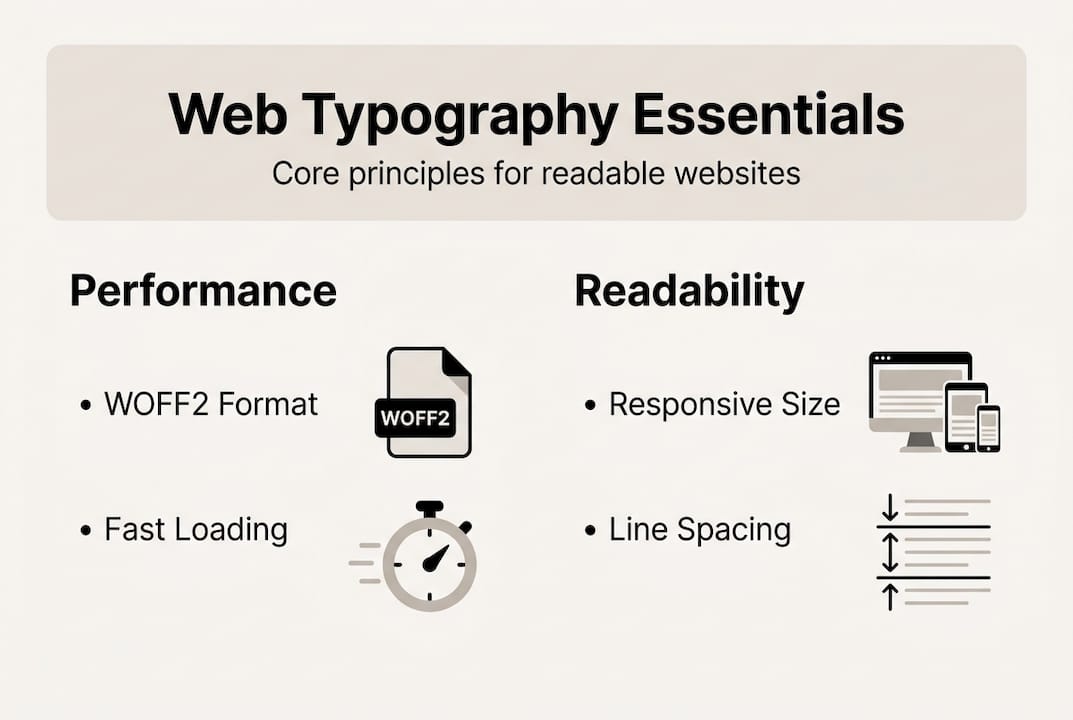
Responsive scaling is another area many small business sites get wrong. Text that looks great on a desktop can become tiny or overwhelming on a phone. Use relative units like "rem` rather than fixed pixel sizes so your typography scales naturally across devices.
For real-world inspiration, check out these service website design examples to see how professional type systems work in practice.
Pro Tip: Open your site on your phone and read a full paragraph out loud. If you stumble, squint, or lose your place, your typography needs attention. That’s your quickest font overload check.
Comparing font choices: What actually matters for screens?
To make these best practices actionable, let’s compare the main font options you’ll encounter.
The serif versus sans-serif debate has gone on for decades. Serifs are fonts with small decorative strokes at the ends of letters, like Times New Roman or Georgia. Sans-serifs have clean, stroke-free endings, like Arial or Helvetica. Traditionally, print designers favoured serifs for long-form reading. But on screens, the rules are different.
Studies show no significant difference between serif and sans-serif for screen readability, with Verdana and Georgia performing best overall. What’s more striking is that individual font quality and spacing can boost reading speed by up to 35%. That’s a significant gain from a simple font swap.
Here’s a straightforward comparison to guide your choices:
| Font type | Best use case | Performance impact | Perception |
|---|---|---|---|
| Sans-serif | Body text, UI labels | Fast loading, highly readable | Modern, clean, approachable |
| Serif | Headings, editorial content | Slightly heavier files | Traditional, authoritative |
| Variable fonts | Full site typography | Smallest file size overall | Flexible, contemporary |
| Display/decorative | Logo, hero text only | Largest files, slowest | Distinctive, but risky |
For most NZ small business sites, a sans-serif body font paired with either a serif or variable font for headings is the sweet spot. It’s readable, fast, and professional.
When evaluating any font, ask yourself:
- Is it legible at small sizes on a phone screen?
- Does it load quickly, ideally under 50KB?
- Does it reflect the personality of my brand?
- Is it available in the weights I need without loading multiple files?
For technical sectors, engineering web design shows how clean, precise typography reinforces credibility in specialist industries. The font choices there are deliberate and purposeful, not decorative.
The bottom line: stop agonising over serif versus sans-serif. Pick a high-quality font, set it up correctly, and focus on spacing and hierarchy.
Optimising web typography for branding and performance
Branding and performance go hand in hand. Let’s see how to unite both through smart typography.
Consistency is the foundation of brand recognition. When your fonts, sizes, and spacing are the same across every page, visitors build a subconscious familiarity with your brand. That familiarity becomes trust. A bakery using a warm, rounded sans-serif consistently across their site, from the homepage headline to the contact form, feels cohesive and intentional. See how this works in a real-world typography case study.
On the technical side, 88% of websites use web fonts in 2026, with 72% self-hosting them. WOFF2 format accounts for 65% of font requests, and the median font file size sits at 35 to 40KB. These numbers tell you what the best-performing sites are doing. Follow their lead.
Here’s a simple optimisation checklist:
- Convert your fonts to WOFF2 format if they aren’t already.
- Self-host your fonts rather than loading them from external services.
- Use
font-display: swapin your CSS to prevent invisible text during loading. - Subset your fonts to include only the characters you actually use.
- Test your site speed with Google PageSpeed Insights after any font change.
For a quick overview of how font choices affect performance, the latest font performance data from the Web Almanac is worth a look.
| Optimisation step | Effort level | Performance gain |
|---|---|---|
| Switch to WOFF2 | Low | High |
| Self-host fonts | Medium | Medium to high |
| Use variable fonts | Medium | High |
| Subset font files | Medium | Medium |
| Add font-display: swap | Low | Medium |
Pro Tip: Flash of Invisible Text (FOIT) happens when a browser waits for a custom font to load before showing any text. Adding font-display: swap to your CSS tells the browser to show a fallback font first, so visitors always see content immediately.
Performance gains aren’t just technical wins. Faster sites rank better in Google, keep visitors engaged, and reduce the frustration that sends people to your competitors.
Why most small businesses underestimate typography’s ROI
Here’s an uncomfortable truth: most small business owners treat typography as an afterthought because they assume visitors don’t notice it. They’re wrong.
Visitors don’t consciously think “this font is bad.” But they do feel uneasy, lose confidence, and leave. The connection between poor type and lost conversions is real, even if it’s invisible. We’ve seen it repeatedly with clients who came to us after wondering why their website design examples looked fine to them but weren’t converting.
The common excuses are predictable. “It costs too much.” “The default theme looks okay.” “No one cares about fonts.” But fixing typography is often one of the cheapest improvements you can make, and it quietly lifts everything else. Better readability means more time on site. More time on site means more trust. More trust means more enquiries.
Letter spacing, line height, font weight. These details feel minor. They’re not. They’re the difference between a site that feels polished and one that feels like a template nobody bothered to customise. Your brand confidence shows in the smallest details, and typography is where that confidence either shines or disappears.
Don’t underestimate it.
Transform your website with expert NZ design
Good typography doesn’t happen by accident. It takes deliberate choices, technical know-how, and an eye for how design and performance work together. If you’ve been making do with default theme fonts or guessing at what works, there’s a better way.

At Virtual Innovation, we help New Zealand businesses build websites that look great and perform even better. Whether you need a WordPress website design that reflects your brand with precision, or a Shopify web agency partner to lift your online store, we bring the typography expertise and technical skill to make it happen. We’re Auckland-based, easy to work with, and we speak plain English. Let’s make your website work harder for your business.
Frequently asked questions
What are the easiest fonts for websites?
Fonts like Open Sans, Roboto, and Verdana are highly readable, fast-loading, and work well for body text. The Web Almanac 2025 recommends sticking to one to three font families for best results.
Does using too many fonts slow down my site?
Yes. Each font file adds to your page load time, which hurts both user experience and search rankings. Self-hosting WOFF2 fonts with a median size of 35 to 40KB keeps things lean and fast.
Is there a best choice between serif and sans-serif for web?
Not really. Research shows little difference in readability between the two on screens. Spacing, size, and overall font quality matter far more than the category.
How do I check if my website’s typography is effective?
Test your site on mobile, read through key pages, and check your bounce rate in Google Analytics. Poor typography raises bounce rates, so a spike there is often a sign something needs fixing.