Table of Contents
Did your FAQ page get thrown together at the last minute?
It’s easy to forget about once the site goes live, but it might be one of the most important trust-builders you’ve got.
But here’s the thing, your FAQ page is one of the most visited and most underused trust-builders on your site. When done right, it doesn’t just answer questions. It removes doubt, boosts credibility, and helps people feel ready to take action.
So if your FAQ section is currently just a list of “what’s your return policy?” and “how much do you charge?”, it’s time for a rethink.
Here’s how to turn a bland FAQ page into a hard-working part of your website.
What Makes a Good FAQ Page?

A good FAQ page does 3 things:
- Answers real questions your customers are asking
- Overcomes objections or hesitation
- Supports your customer journey, not just at the start, but right before someone decides to contact or buy from you
It’s not about cramming every possible question on a single page. It’s about picking the right questions, and answering them with the right tone, clarity, and even personality.
Why FAQs Matter (More Than You Think)
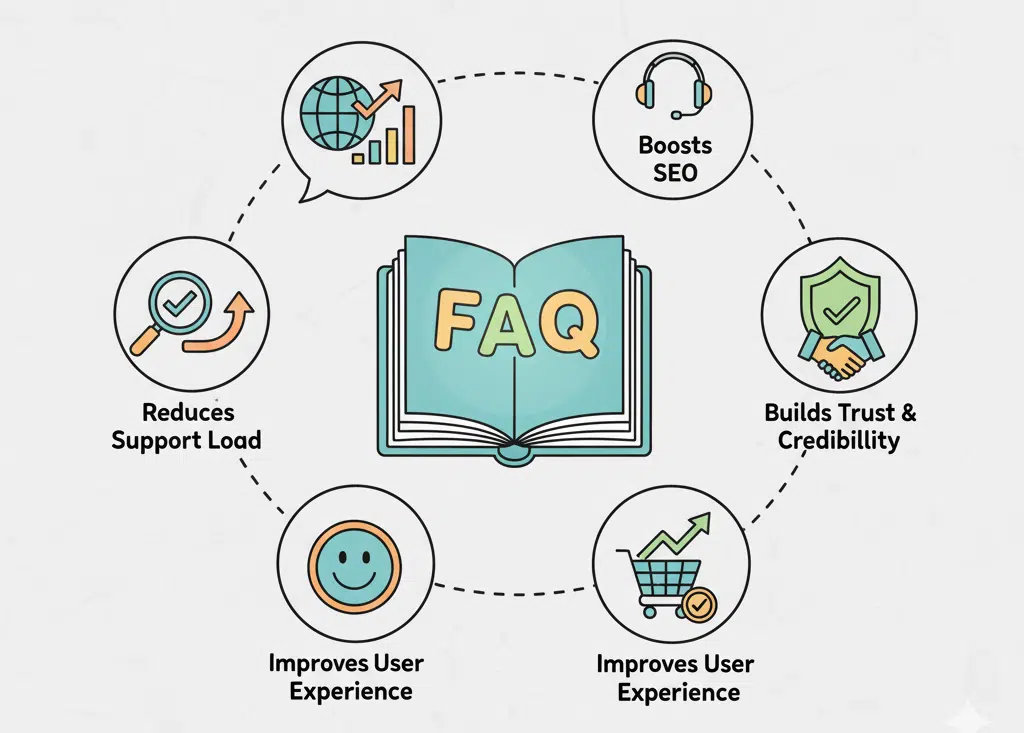
Here’s why this often-ignored page is so important:
Reduces customer support queries
The clearer your FAQ page is, the fewer “just checking…” emails you’ll get.
Builds trust through transparency
People want to know what they’re signing up for. Clear, honest answers build confidence.
Improves SEO and on-site time
Well-written FAQs help with voice search and long-tail keywords, and keep people browsing longer.
Handles objections
Think: pricing concerns, timeframes, or “what if it doesn’t work?” worries. Tackle them head-on.
Still got an FAQ page from 2020 sitting at the bottom of your page?
You’re not alone, we see this all the time. It’s one of the most forgotten pages on a website, and it could be quietly working against you.
What to Include in a Great FAQ Section
1. The Real Questions You Hear All the Time
Start with the questions people ask you over the phone, in contact forms, or at meetings. These are gold.
Examples:
- “How long does it take to get a quote?”
- “Do you work with small businesses?”
- “Can I make changes to my website later?”
- “What if I’m not tech-savvy?”
Tip: Check your emails and DMs, that’s where the real FAQs live.
2. The Objections People Are Thinking (But Not Saying)
These are the “but what if…” questions that stop someone from clicking ‘book a call.’
Examples:
- “I’m not ready to commit yet, can I get advice first?”
- “Is this going to cost thousands?”
- “What if I don’t know what I want yet?”
Handle these with reassurance and clarity, not sales talk.
3. SEO-Friendly Questions
Think of how people Google your service.
Examples:
- “How much does a website cost in New Zealand?”
- “Is WordPress good for small businesses?”
- “What’s the best website platform for eCommerce?”
Use real language your audience would type into Google, and link to deeper blog content where possible. We talk more about how to write SEO-friendly content here.
4. Tone That Matches Your Brand
FAQs don’t have to be robotic.
Use your brand voice. If your business is friendly and relaxed, your FAQs can be too. If you’re all about clarity and confidence, keep them sharp.
Example:
- Instead of “Yes, we offer maintenance plans”
Try: “Yep, we’ve got your back. Ongoing support is part of what we do.”
How to Write FAQs That Build Trust

- Keep answers short but helpful (2–4 lines is often enough)
- Link to relevant services or blog posts for deeper info
- Avoid jargon, plain language wins every time
- Break them into categories if you have more than 10
- Update it regularly (quarterly is a good rhythm)
Here’s a Basic FAQ Layout You Can Steal
Q: What if I don’t know what kind of website I need?
A: That’s totally fine. We help guide you through the process with clear questions and simple options.
Q: How long does a project take?
A: Most sites take 3–6 weeks, depending on the size and content. We’ll give you a clear timeline at the start.
Q: Do you offer ongoing support after the site goes live?
A: Absolutely. We offer maintenance plans or on-call support depending on what suits you.
Q: What platforms do you build with?
A: We mostly work with WordPress and Shopify, but we’ll always recommend the best platform for your needs.
Bonus Tip: Add a Search Bar or Accordion
If your FAQ is long, make it easy to scan. Use expandable accordion-style layouts or a search/filter function.
And if someone finishes reading the FAQs but still has questions?
Make sure there’s a friendly “Still unsure? Let’s chat” CTA at the bottom.
Here’s how to make your lead generation forms better too.
Final Thought
Your FAQ page isn’t just there to tick a box.
It’s a conversation. It’s your chance to address worries, show personality, and give people the confidence to move forward with you, all without needing a phone call.
So if your current FAQ page looks like filler, give it some love.
And if you’re not sure where to start? Let’s take a look together.
💻 Need help with your digital presence?
We offer:
📞 Contact us today to elevate your brand online.
👉 [Book a Call Now] with our Auckland-based WordPress development team.